
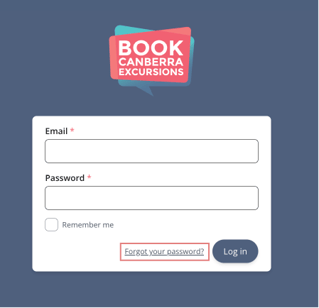
Step 1 — Go to the Login Page
-
Open your browser.
-
Navigate to the Book Canberra Excursions Login Page.
-
Click Forgot your password?
Step 2 — Enter Your email address
-
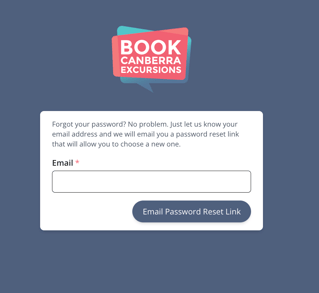
Enter the email address you used to create your BCE account.
-
Click Email Password Reset Link
-
A confirmation message will appear in green, letting you know an email has been sent.
Step 3 — Check Your Email
-
Open your email inbox.
-
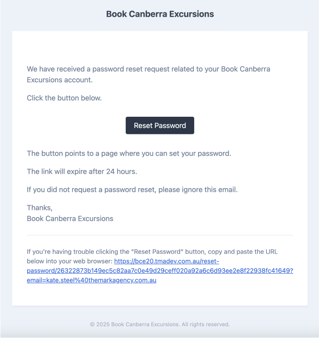
Look for a message with a subject: Book Canberra Excursions - Reset Password.
-
If you cannot see the email:
-
Check Spam/Junk folders.
-
Wait 1–2 minutes, then refresh your inbox,
-
Step 4 — Open the Reset Link
-
Open the email and click the Reset Password button.
-
The link will take you to a Book Canberra Excursion page where you can create a new Password.
Important:
Password reset links expire after 24 hours.
If you do not use the link within 24 hours you will have to repeat the Steps above.
Step 5 — Create a New Password
Follow the prompts and create a strong Password.
Your Password should:
-
Be at least 8–12 characters.
-
Include a mix of uppercase and lowercase letters.
-
Contain numbers.
-
Include special characters (e.g. ! @ # $ %).
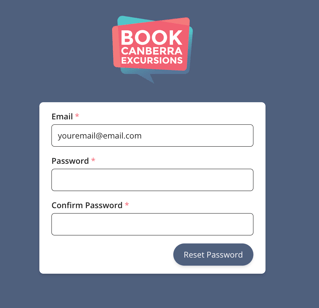
Then, click Reset Password.