---
title: How to Submit a Draft Trip
description: submit a draft booking or draft trip
---
[Skip to content](https://help.bookcanberraexcursions.com.au/knowledge-base/how-to-submit-a-draft-trip#main-content)
English - Australia
Show submenu for translations

Open main navigation
Close main navigation
- English - Australia
Show submenu for translations
- [Contact us](mailto:Support@bookcanberraexcursions.com.au)
[Contact us](mailto:Support@bookcanberraexcursions.com.au)
How can we help you?
- There are no suggestions because the search field is empty.
1. [General User Help](https://help.bookcanberraexcursions.com.au/knowledge-base?hsLang=en-au)
2. [Bookings](https://help.bookcanberraexcursions.com.au/knowledge-base/bookings?hsLang=en-au)
3. [For Tour Operators & Teachers](https://help.bookcanberraexcursions.com.au/knowledge-base/bookings?hsLang=en-au#for-tour-operators-teachers)
# How to Submit a Draft Trip
Follow the steps below to **Submit a Draft Trip.**
**Steps:**
1. **Locate the Trip:** Go to the **Plan a Trip** tab in the left navigation column, then find the Draft Trip you want to submit.
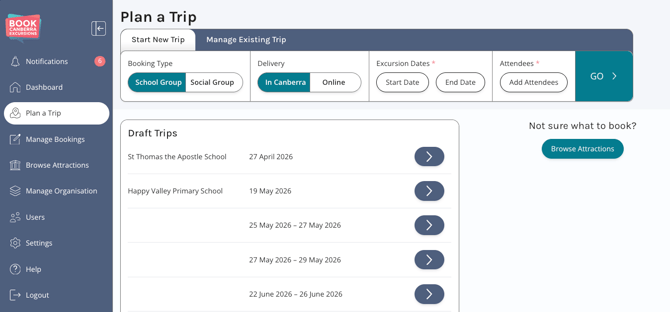
2. **Open the Trip:** Click the **Arrow** \[\>\] on the right side of the Trip row.
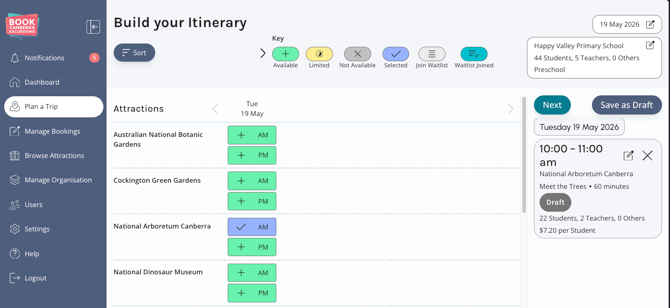
3. Click the **Next** button near the top of the right navigation column.
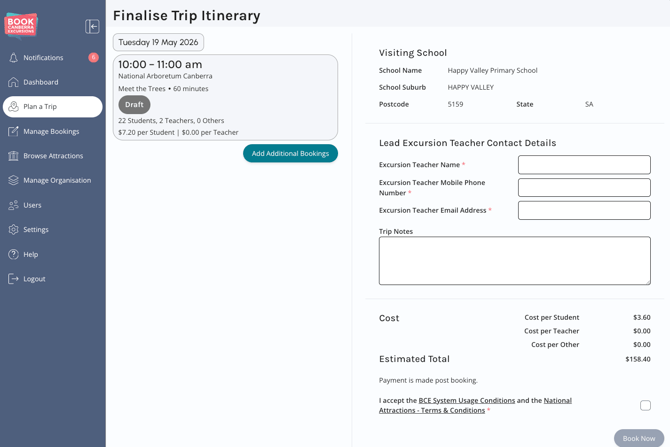
4. Enter the required **Lead Excursion Teacher Contact Details**.
****
5. Tick the checkbox above **Book Now** button.
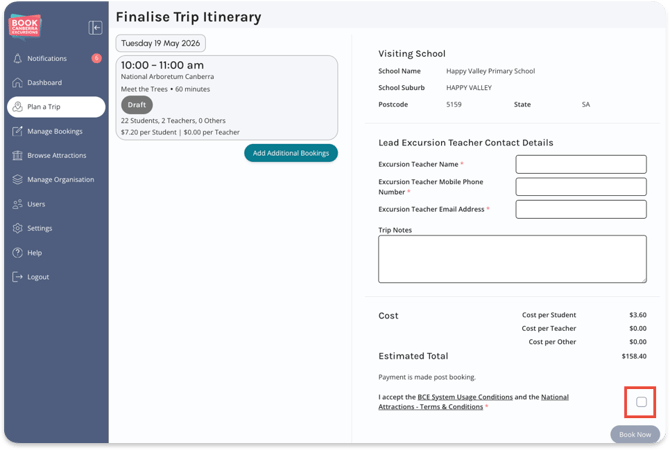
6. Click **Book Now** to submit the Trip
Even if some of a Trip's Bookings are Pending or Approved you can follow the process outlined above to submit Draft Bookings associated with the Trip.
- [Accounts](https://help.bookcanberraexcursions.com.au/knowledge-base/accounts?hsLang=en-au)
- [Attractions](https://help.bookcanberraexcursions.com.au/knowledge-base/attractions?hsLang=en-au)
- [Bookings](https://help.bookcanberraexcursions.com.au/knowledge-base/bookings?hsLang=en-au#main-content)
- [For Tour Operators & Teachers](https://help.bookcanberraexcursions.com.au/knowledge-base/bookings?hsLang=en-au#for-tour-operators-teachers)
- [For Attractions](https://help.bookcanberraexcursions.com.au/knowledge-base/bookings?hsLang=en-au#for-attractions)
- [Documents](https://help.bookcanberraexcursions.com.au/knowledge-base/documents?hsLang=en-au)
- [Manage Your Organisation](https://help.bookcanberraexcursions.com.au/knowledge-base/manage-your-organisation?hsLang=en-au)
- [Notifications](https://help.bookcanberraexcursions.com.au/knowledge-base/notifications?hsLang=en-au)
[](https://www.bookcanberraexcursions.com.au/)
[mailto:support@bookcanberraexcursions.com.au](mailto:support@bookcanberraexcursions.com.au)
Copyright © 2025,