---
title: How to Create a New User
description: create a new user in your organisation
---
[Skip to content](https://help.bookcanberraexcursions.com.au/knowledge-base/how-to-create-new-user#main-content)
English - Australia
Show submenu for translations

Open main navigation
Close main navigation
- English - Australia
Show submenu for translations
- [Contact us](mailto:Support@bookcanberraexcursions.com.au)
[Contact us](mailto:Support@bookcanberraexcursions.com.au)
How can we help you?
- There are no suggestions because the search field is empty.
1. [General User Help](https://help.bookcanberraexcursions.com.au/knowledge-base?hsLang=en-au)
2. [Manage Your Organisation](https://help.bookcanberraexcursions.com.au/knowledge-base/manage-your-organisation?hsLang=en-au)
# How to Create a New User
BCE Users with an Owner role can add different Users in their organisation and assign them roles.
Follow the steps below to add a User in your organisation.
Only BCE Owners can manage Users.
**Steps:**
1. **Login** to BCE.
2. Go to the **Users** Tab in the left navigation menu.
3. Click the **Add User** button in the top right corner.
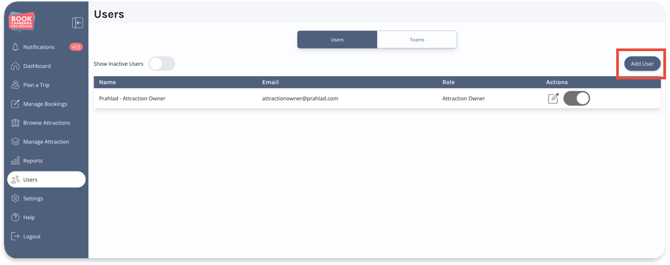
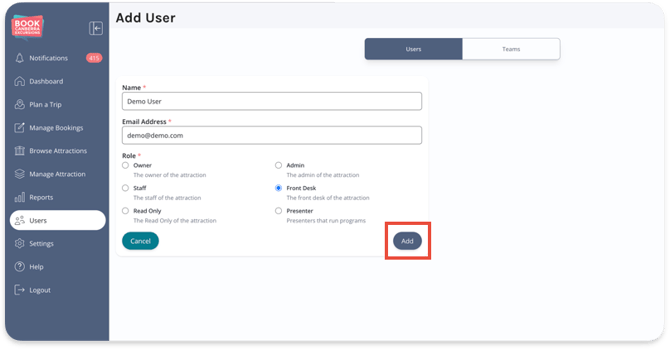
4. Enter the Name and Email Address of the new User and give them a Role. See [Understanding User Roles](https://442278157.hs-sites-ap1.com/knowledge-base/understanding-user-roles?hsLang=en-au) to learn more about Roles.
5. Click **Add** button to add the new user
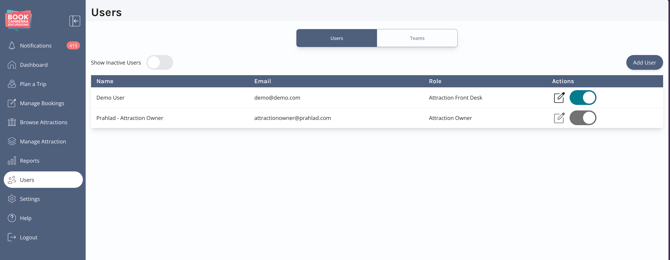
6. You'll now see the new User added to your organisation's User list.
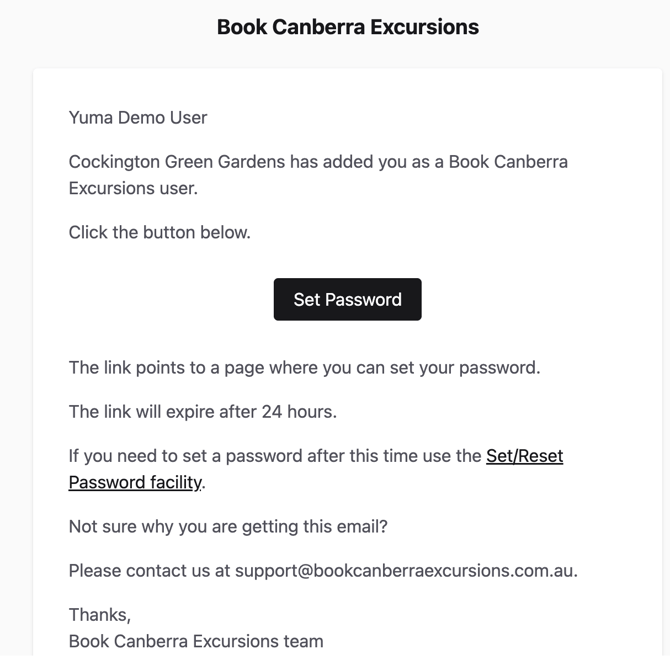
BCE will send an email to the new User's email address asking them to set up their password for BCE (see example below).
They must action this within 24 hours of receiving the email.
- [Accounts](https://help.bookcanberraexcursions.com.au/knowledge-base/accounts?hsLang=en-au)
- [Attractions](https://help.bookcanberraexcursions.com.au/knowledge-base/attractions?hsLang=en-au)
- [Bookings](https://help.bookcanberraexcursions.com.au/knowledge-base/bookings?hsLang=en-au#main-content)
- [For Tour Operators & Teachers](https://help.bookcanberraexcursions.com.au/knowledge-base/bookings?hsLang=en-au#for-tour-operators-teachers)
- [For Attractions](https://help.bookcanberraexcursions.com.au/knowledge-base/bookings?hsLang=en-au#for-attractions)
- [Documents](https://help.bookcanberraexcursions.com.au/knowledge-base/documents?hsLang=en-au)
- [Manage Your Organisation](https://help.bookcanberraexcursions.com.au/knowledge-base/manage-your-organisation?hsLang=en-au)
- [Notifications](https://help.bookcanberraexcursions.com.au/knowledge-base/notifications?hsLang=en-au)
[](https://www.bookcanberraexcursions.com.au/)
[mailto:support@bookcanberraexcursions.com.au](mailto:support@bookcanberraexcursions.com.au)
Copyright © 2025,