---
title: How to Create a Custom Booking
description: create a custom booking
---
[Skip to content](https://help.bookcanberraexcursions.com.au/knowledge-base/how-to-create-a-custom-booking#main-content)
English - Australia
Show submenu for translations

Open main navigation
Close main navigation
- English - Australia
Show submenu for translations
- [Contact us](mailto:Support@bookcanberraexcursions.com.au)
[Contact us](mailto:Support@bookcanberraexcursions.com.au)
How can we help you?
- There are no suggestions because the search field is empty.
1. [General User Help](https://help.bookcanberraexcursions.com.au/knowledge-base?hsLang=en-au)
2. [Attractions](https://help.bookcanberraexcursions.com.au/knowledge-base/attractions?hsLang=en-au)
# How to Create a Custom Booking
Book Canberra Excursions allows you to create Custom Bookings on behalf of a Teacher or a Tour Operator, or you can Retain Ownership of a Booking.
To create a Custom Booking you must have an Attraction Owner or Admin role.
We don't encourage you to Retain Ownership unless absolutely needed.
If you Retain Ownership, you'll be responsible for confirming the booking.
**Steps**
1. Click **Manage Bookings** in the left navigation menu.
2. Select the **Custom Booking** option from the list of options at the top.
3. Select the Program, date, start time, and end time.
4. Under **Group Type:**
1. If there's an existing Trip enter the **Trip ID** and fill out rest of the form.
2. If the Booking is for a School, select **School** from the dropdown and fill out the school name.
3. If the Booking is for a Social Group or Other, select **Social Group / Other** from the dropdown and fill out the Group Name.
5. Select the **Staff Member** if the Booking is done on behalf of a School. Or select **Tour Operator** and **Staff Member** if the booking is done on behalf of the Tour Operator.
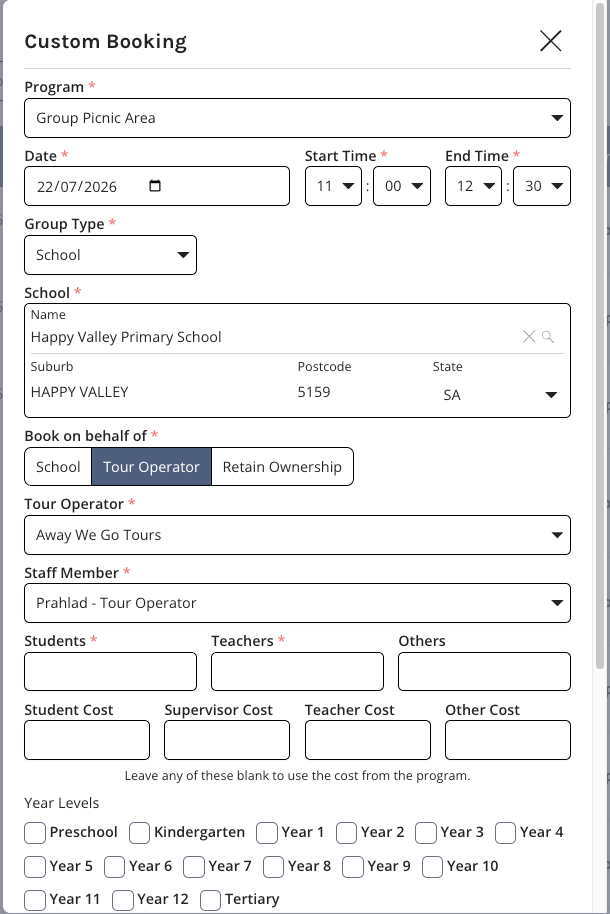
6. Fill the rest of the form.
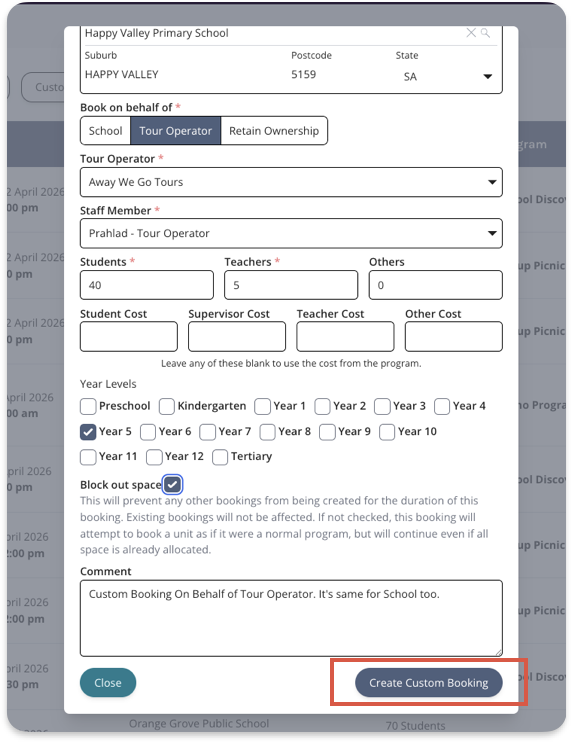
7. Check **Block out space** to prevent other Bookings being created for the duration of this Booking.
8. Submit the Booking by clicking the **Create Custom Booking** button at bottom right.
‼️ Please note BCE will not verify the date or time you select for a Program. ‼️
You must confirm a Program is available on your selected date and at your selected time, and that your attraction can deliver it.
Once a Custom Booking is submitted you can find it under the **Manage Bookings** tab.
A Teacher or Tour Operator must enter Lead Excursion Teacher details if you make a Booking on their behalf.
See [How to Update Lead Excursion Teacher Contact Details](https://help.bookcanberraexcursions.com.au/knowledge-base/how-to-update-lead-excursion-teacher-contact-details?hsLang=en-au) for more information.
- [Accounts](https://help.bookcanberraexcursions.com.au/knowledge-base/accounts?hsLang=en-au)
- [Attractions](https://help.bookcanberraexcursions.com.au/knowledge-base/attractions?hsLang=en-au)
- [Bookings](https://help.bookcanberraexcursions.com.au/knowledge-base/bookings?hsLang=en-au#main-content)
- [For Tour Operators & Teachers](https://help.bookcanberraexcursions.com.au/knowledge-base/bookings?hsLang=en-au#for-tour-operators-teachers)
- [For Attractions](https://help.bookcanberraexcursions.com.au/knowledge-base/bookings?hsLang=en-au#for-attractions)
- [Documents](https://help.bookcanberraexcursions.com.au/knowledge-base/documents?hsLang=en-au)
- [Manage Your Organisation](https://help.bookcanberraexcursions.com.au/knowledge-base/manage-your-organisation?hsLang=en-au)
- [Notifications](https://help.bookcanberraexcursions.com.au/knowledge-base/notifications?hsLang=en-au)
[](https://www.bookcanberraexcursions.com.au/)
[mailto:support@bookcanberraexcursions.com.au](mailto:support@bookcanberraexcursions.com.au)
Copyright © 2025,